

Managing child itineraries
Once a fixed departure master itinerary has been created, and individual client itineraries (child itineraries) have been created from that master trip, you can manage all child itineraries for that fixed departure trip. You can access it from the 'Trips' section of your account by clicking on the relevant fixed departure trip.
What you'll see
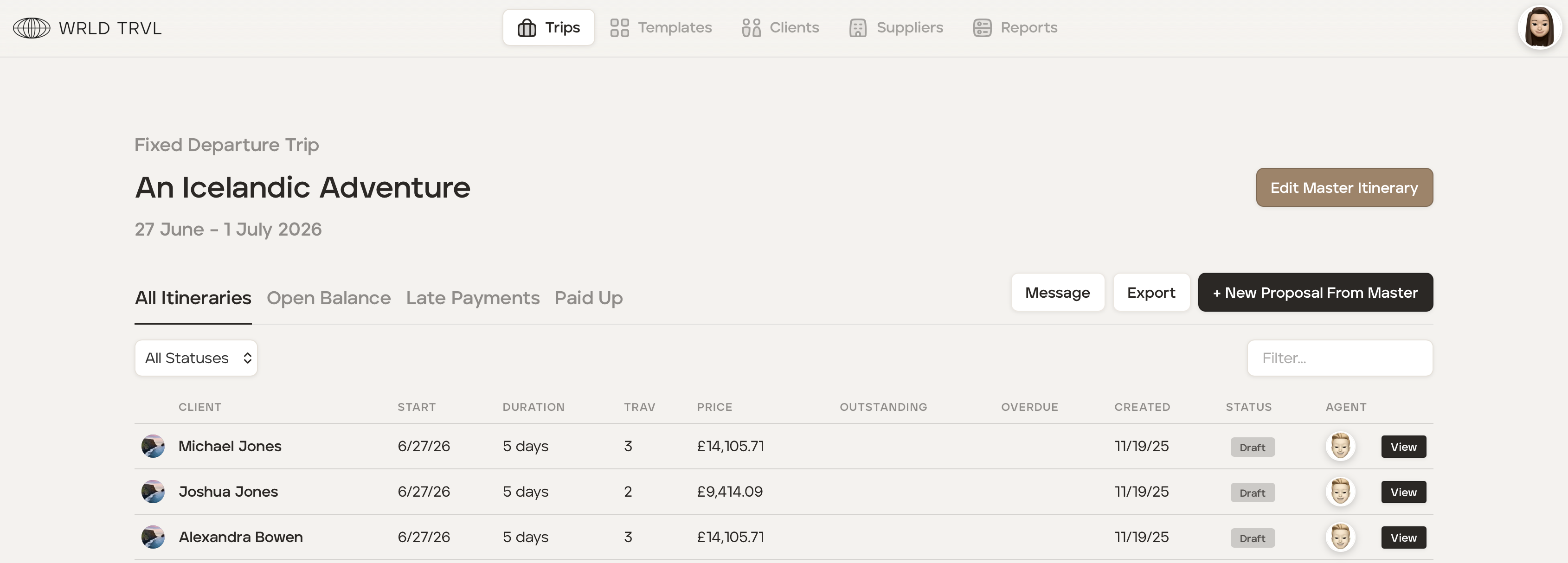
When you are in the fixed departure trip, at the top, you'll see the name of the fixed departure trip and the dates it's running. There are four tabs:
All itineraries - Every child itinerary is listed here regardless of the status (proposal or upcoming).
Open Balance - All itineraries with an outstanding balance, and the amount owed.
Late Payments - All itineraries where a payment is overdue/late.
Paid Up - All itineraries that are fully paid based on payments recorded in your account.
Actions available
Edit Master Itinerary - Clicking the 'Edit Master Itinerary' takes you back into the master itinerary so you can make changes to the trip content. Any changes made here will cascade to all linked ('connected') child itineraries automatically.
Message - You can send a bulk message to all travellers across every child itinerary in the fixed departure trip by clicking the 'Message' button.
See How to bulk message travellers on a 'fixed departure' upcoming trip.
Export - You can download a traveller report and financial report of all child itinerary details across the fixed departure trip.
Add New Proposal From Master - You can create a new child itinerary from the master itinerary by clicking '+ New Proposal From Master.'